
‘Chinese’ Archives
Official OS 6.0.0.246 For The BlackBerry Torch 9800 From AT&T
 October 6th, 2010 @ 1:36 PM | By: Mauricio
AT&T has posted 3 versions of OS 6.0.0.246: Multilanguage (Western languages), Asia (Chinese, Japanese, Korean, Thai, and Indic), and All Languages (East Asia Languages Included). When you visit the download page and select the Torch from the drop down, make sure you choose the right version on the next page.
Software For BlackBerry® Torch™ 9800 smartphone
BlackBerry Handheld Software v6.0.0.695 (Multilanguage)
Package Version: 6.0.0.695
Consisting of:
- Applications: 6.0.0.246
- Software Platform: 6.4.0.105
- File name: 9800M_PBr6.0.0_rel695_PL6.4.0.105_A6.0.0.246_AT_amp_T.exe
- File size: 161.7MB
Note: The Software Platform and Applications version numbers can be found under Options-About screen on the handheld.
- Download: OS 6.0.0.246 for the BlackBerry Torch 9800 from AT&T
- How To:
- Backup And Restore Your BlackBerry
- Upgrade your BlackBerry Operating System (OS)
Please report any feedback/findings in the comments.
REMEMBER: It is recommended that you make a backup before attempting to upgrade your BlackBerry just in case something goes wrong during the upgrade process. *
Thanks @JerryD!
 Filed Under Operating System Updates
 View Comments

BlackBerry Desktop Manager For Mac Updated To Version 1.0.3.16 With Fixes & Improvements
May 20th, 2010 @ 9:29 PM | By: Mauricio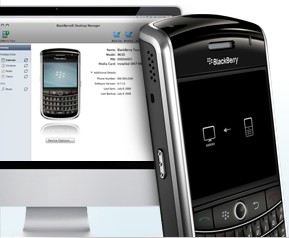
RIM has updated BlackBerry Desktop Manager for Mac to version 1.0.3.16, a small update but it comes with significant enough changes.
BlackBerry® Desktop Software for Mac version 1.0.3 provides support for the Japanese, Korean, Simplified Chinese and Traditional Chinese languages, and includes a variety of fixes and improvements to the organizer data and music synchronization. If you are already using version 1.0.3, this update provides an important fix to the product. More details are available in the release notes at http://docs.blackberry.com.
If you already have Desktop Manager for Mac installed it will prompt you to update the next time you run it. For more info or to download Desktop Manager for Mac go to blackberry.com/mac from your desktop browser.
via CB | Thanks @Moestepp!
Filed Under Desktop & Server Software
View Comments

Free BlackBerry Apps To Help You Learn Chinese, French, Italian Or Spanish From S4BB Limited [Application]
May 5th, 2010 @ 12:14 PM | By: Mauricio
When S4BB Limited let me know about their new LearnFrench app I checked their page in the store and found that they also offer apps to learn Chinese, Italian and Spanish, all for free! Each app has more than 400 self-contained audio lessons to pick from so you can choose the lessons that suit your level and interests to build on your knowledge of that language.
- All audio lessons are easy to understand and contain useful phrases and dialogues. You can schedule your own time when you want your lessons to begin. Anytime, 24/ 7, lessons are available for you to access immediately. Lessons are short, effective, easy and fun, you can sit at home, in the office, or any other place to study Mandarin Chinese, French, Italian or Spanish.
If you’ve wanted to learn any of these languages here’s your chance to get started with these free apps:
Be sure to check out the rest of their apps as they have others you may find useful. If you try out the language apps let me know what you think!
Filed Under Apps & Games
View Comments

SugarSync Releases First International Versions, Enhances User Experience For All [Desktop Software]
December 16th, 2009 @ 12:48 PM | By: MauricioSugarSync has announced a bunch of enhancements that will make backing up and sharing easier to use for more people. While these enhancements don’t apply to their SugarSync Mobile application for BlackBerry, I figured it was worth mentioning for those who regularly use SugarSync on both their desktop computer and mobile device. Key features in these updates include:
- New Sync Option
The SugarSync setup process is now more flexible than ever when syncing files across multiple computers. Users may now initiate a “sync request” from the computer currently in use directly to any other computer associated with the account. When a user logs into the receiving computer, SugarSync will prompt for the folder to be accepted. Previously, users could only initiate the sync setup on the destination computer, not the source computer. Additional details on the new sync functionality are available here. - New Upload Speed Option in SugarSync Free:
SugarSync now offers faster upload speeds for free 2GB account holders. Upon upgrading to the new SugarSync Manager application, users may to choose to change the upload speed in the Preferences panel. The three levels are: Low (uses 50% of available bandwidth), Medium (uses 80% of available bandwidth), and High (uses 100% of available bandwidth). - Removal of SugarSync Icon in the Mac Dock
As requested by many SugarSync Mac users, the SugarSync icon is now removed from the dock. All key actions are now available via the SugarSync icon in the menu bar. - SugarSync Live
Last week, the company also launched SugarSync Live ($99.99/year), a new annual customer service package option enabling users to connect directly via telephone with SugarSync product experts seven days a week. Users can call and ask for tips to better use all of SugarSync’s features, learn unique ways to customize the service, add additional storage, get immediate help in case of a product issue, or update account status.
SugarSync offers various pricing options, including a free 2 GB account. I’ve included info about the SugarSync Mobile application and the full press release after the jump.
Filed Under Desktop & Server Software
View Comments
Free YouVersion Bible App For BlackBerry Updated With Twitter Integration And More
October 19th, 2009 @ 8:30 AM | By: MauricioIt’s been a while since the YouVersion Bible app for BlackBerry was mentioned here on BBRocks! but LifeChurch.tv just pushed out an update that will make it more sociable. Here’s a recap on YouVersion’s main features:
- 40 different translations in 22 languages (including Spanish, German, French, Chinese, and more)
- The One-Year Reading Plan provides daily selections to keep you on track when you’re on the go.
- Search the entire Bible for a word, phrase, or verse, and get your results in seconds.
- Jump to a verse quickly by typing the reference in the search box.
- Learn from others by checking out recent contributions. Just tap the number next to the verse.
- Compatible with BlackBerry OS v4.2.1 or higher, and on these devices: 9000, 8900, 88xx, 87xx, 8300, 8220, 81xx, 7130.
YouVersion v2.0.3 includes the following updates:
- When you leave a YouVersion Live event, the message to save notes is better. Pressing save on the dialog takes you to the screen to email your notes.
- There is a new menu item on the YouVersion Live event screen to go to the edit notes area.
- YouVersion Live Event description has been removed from the header and added to top of scrolling area.
- YouVersion Live Event times are now added to the date area of the header.
- The YouVersion Live Event widget titles should now completely reflect what the admin of the event setup.
For more info or to download the YouVersion Bible app visit youversion.com/bb.
Filed Under Apps & Games
View Comments
ProTranslate Lite: Free And Simple Translation Application For BlackBerry
July 22nd, 2009 @ 9:30 AM | By: Mauricio
Here’s a translation application called ProTranslate Lite that supports a bunch of languages and has some nice features:
- Support for English Chinese Japanese French Russian German Dutch Greek Italian Spanish and most of major languages.
- Save Language settings
- Send translated text via SMS/email
- Easily swap between languages
This application uses Google’s API and requires an internet connection to work. Related ads are shown in order to keep this application free and help with development.
ProTranslate Lite is available for all BlackBerry devices as a free download in the store.
If you try this out let me know how it works for you in the comments!
Filed Under Apps & Games
View Comments
Translation Software with Speech Capabilities for BlackBerry Smartphones Gets You Connected and Understood
May 18th, 2009 @ 1:49 PM | By: MauricioFound out about this application called Interlecta Translator, a BlackBerry application that can translate any text on your screen, in an SMS or Email.
Features:
- Easy to Use: Intuitive user interface with an option to choose between graphic and plain. Translate option is available in standard device context menus for quick access.
- Fast & Productive: The only software capable of translating 5000 words in one minute. Works with large texts as effortlessly as with short phrases or sentences.
- Lightweight: Between 200 KB and 300 KB, platform dependent. Minimum RAM usage, less than 500 KB storage space needed. May be installed on either auxiliary memory (memory card) or device memory.
- Cost-effective: Requires a minimal amount of internet traffic to work and will not accumulate huge traffic charges. Choice of internet connection type: Wi-Fi or Operator.
The languages in Interlecta Translator include Latin European languages, Cyrillic, Greek, Arabic, Chinese and Japanese as well as rare languages including Pushtu, Tagalog, Somali and Urdu.
There are 3 versions of this application available for a monthly subscription fee:
- Mobile Text Translator ($5/month)
- Mobile SMS Translator ($9.99/month)
- Mobile Email Translator ($11.99/month)
Interlecta Translator will work on any BlackBerry with OS 4.2 and higher.
For more info go to http://www.interlecta.com and http://home.interlecta.com/mobile or check out the full press release after the jump.
Filed Under Apps & Games
View Comments


 Full Content Feed
 Full via Email

- Accessories
- Apps & Games
- Articles & Editorials
- BBRocks! Announcements
- Contests & Giveaways
- Deals & Sales
- Desktop & Server Software
- Device Info & Unboxing
- Events & Live Coverage
- Guides & Tips
- Just4Fun & Humor
- Music & Ringtones
- News & Rumors
- Operating System Updates
- Phone Store
- Polls
- Previews & Reviews
- Random & Misc
- Sites & Services
- Themes & Wallpapers


 Post a Job! $50 for 30 days