Pacemaker is the premiere DJ app for Blackberry. It’s been available for the Playbook for some time now. Blackberry even generously demoed Pacemaker at it’s Blackberry World Party last year, and at all the key press events over the past year.
If you don’t know what Pacemaker is by now, then I certainly can’t help you, but if that happens to be the case, then I encourage you to check out our in-depth evaluation of Pacemaker for the Playbook.
Z10 owners and music enthusiasts can rejoice, Pacemaker is now available for Blackberry 10, and that includes the flagship device. This time around, the app has been specifically optimized for the much smaller Z10.
If you’re a DJ, or you love to make music, then trust me when I say this is the app you want.
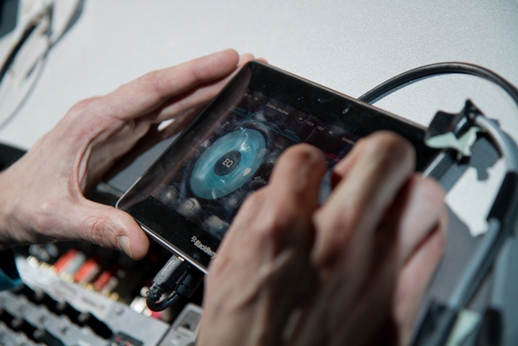
With Pacemaker, you only need the device, some speakers and an amplifier. So, for example, if you’re a DJ and most of the sound equipment is already being provided by the venue, you only need to bring your device.
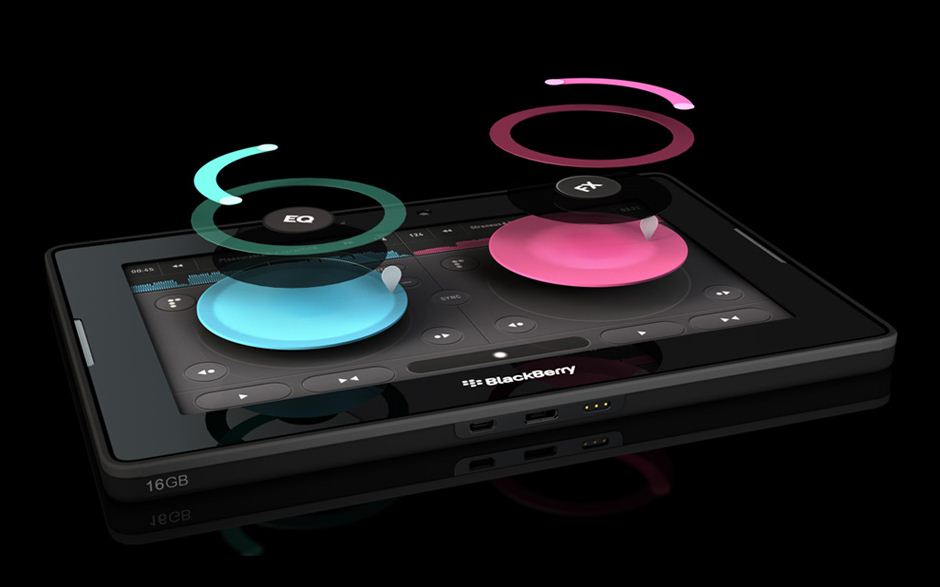
Pacemaker actually gives users professional grade effects, features and support so that they can provide a meaningful performance. In order to cut down on the overall equipment requirements, the Pacemaker Devs have implemented almost every essential DJ effect and attribute via a single drop-down menu. With a swipe down, from the top of the screen, users can call upon a custom menu that includes all the settings for the Pacemaker app.
The app gives you any tools you might want to produce high quality tracks. You essentially don’t need to bring anything else in terms of DJ equipment.
As for features, well there’s a ton. Again, instead of reiterating everything Pacemaker has to offer, I will direct you to my previous review of the software on the Playbook. It’s the same exact software, right along with the same features, it’s just been optimized now for the Z10.
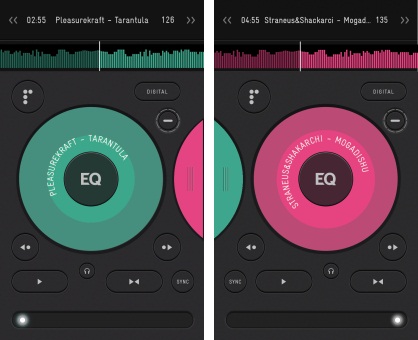
One thing in particular that’s been changed is how the UI works on the smaller screen. In some instances, it’s required to zoom in on the scratch box. Because Pacemaker features two scratch boxes side by side by default, this can’t be done on the smaller screen. Instead the app zooms in on one scratch box, allowing it to take up the whole screen, whereupon you can swipe or pan to the next scratch box if need be. If my description of this new feature still seems unclear at this point, then check out the images below for a better example.

Related posts

BlackBerry Passport Wins the Mobile Madness Contest Held by TechnoBuffalo
by - Apr 13, 2015 5:39 AM
Overview of Advanced Interactions in BlackBerry 10.3.1
by - Apr 10, 2015 5:31 AM

BlackBerry Launches BES 12 Cloud for SMBs and Enterprises
by - Apr 8, 2015 5:21 AM
BlackBerry Apps Once Again!
by - Apr 6, 2015 5:53 AM
BlackBerry Leap up for Pre-Order
by - Apr 3, 2015 5:41 AM
BlackBerry Has Turned Things Around
by - Apr 1, 2015 4:53 AM
The BlackBerry Care Protection Plan for the Passport and the Classic Introduced
by - Mar 30, 2015 1:44 AM
Home › Forums › Pacemaker Now Available and Optimized for the Blackberry Z10
This topic contains 0 replies, has 1 voice, and was last updated by Briley 3 years, 10 months ago.
You must be logged in to reply to this topic.