Do you feel that your BlackBerry device needs a health assessment? Have you already detected a problem that you want to get fixed? If so, you should check out the really cool tool called BlackBerry Virtual Expert. This is a simple diagnostic app for your BlackBerry 10 smart phones.
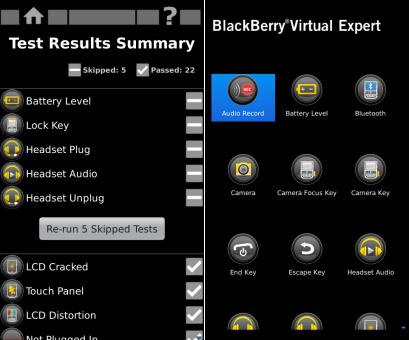
With BlackBerry Virtual Expert (BBVE), you can check the general condition of virtually all parts of your device including your touch screen, LCD, USB port, Camera, Bluetooth, speaker, loudspeaker and vibrator.
Here is an overview of the BlackBerry Virtual Expert.
How to install the BlackBerry Virtual Expert on your phone
Step 1 –Install BBVE
You have to install the BlackBerry Virtual Expert before you can use it.
Tap ‘BlackBerry World’ on your phone and search for ‘Virtual Expert’. Alternatively you can scan a barcode. Just follow these simple steps.
Open ‘BlackBerry World’ and then swipe down from the top of your screen. Tap ‘Scan Barcode’. Scan the QR code and tap ‘Download’.
When you successfully complete the installation, a BBVE icon will appear on the home screen. You can launch BlackBerry Virtual Expert by tapping the BBVE icon.
Step 2 - Perform the various tests
Three test suites are currently available - Display tests, Keypad tests and Audio tests. To conduct the tests, open BlackBerry Virtual World and tap on a test suite. The app will then take through a series of guided hardware tests. You can view the results after you have finished.
You can also perform a specific test. So, for instance, if you believe that there is a problem with a key you just need to run a keypad test.
Go to BlackBerry Virtual Expert. Then tap the ‘Tests’ icon. You will find it along the bottom toolbar. Now tap ‘Keypad’ to complete the test.
Step 3 - Where to find help
In case BlackBerry Virtual Expert finds a problem with your phone and you need additional assistance, you can do the following to get the problem resolved quickly.
Create a short description of the problem and all the troubleshooting steps you have taken. Mention the OS version of your BlackBerry 10 phone and PIN. You can quickly relay this information for speedy assistance.
To find out which version of BlackBerry you are running, tap ‘Settings’ and then tap ‘About’. Change the ‘Category’ bar to ‘OS’.
To find out your PIN, tap ‘Settings’ and then tap ‘About’. Change the ‘Category’ bar to ‘Hardware’.
Before contacting BlackBerry support for a problem, you have to back up all the data on your BlackBerry device. You can do this by downloading and installing BlackBerry Link for Mac or PC from the following URL: http://us.blackberry.com/software/desktop/blackberry-link.html
 When you contact them for support, they will ask whether you have backed up your device. If you have already done that, you will receive assistance right away.
You can also join the BlackBerry Community Support Forums. Create a new forum post explaining your problems. Don’t forget to provide a description of the problem and all troubleshooting steps you have already tried.
You may also contact your local repair center or wireless provider about the problem.
With BlackBerry Virtual Expert, detecting problems with your device is easy.
Related posts

BlackBerry Passport Wins the Mobile Madness Contest Held by TechnoBuffalo
by - Apr 13, 2015 5:39 AM
Overview of Advanced Interactions in BlackBerry 10.3.1
by - Apr 10, 2015 5:31 AM

BlackBerry Launches BES 12 Cloud for SMBs and Enterprises
by - Apr 8, 2015 5:21 AM

BlackBerry Apps Once Again!
by - Apr 6, 2015 5:53 AM
BlackBerry Leap up for Pre-Order
by - Apr 3, 2015 5:41 AM

BlackBerry Has Turned Things Around
by - Apr 1, 2015 4:53 AM

The BlackBerry Care Protection Plan for the Passport and the Classic Introduced
by - Mar 30, 2015 1:44 AM
Home › Forums › How to Detect Problems Using BlackBerry Virtual Expert
This topic contains 0 replies, has 1 voice, and was last updated by Thea Neuman 3 years ago.
You must be logged in to reply to this topic.