BlackBerry recently launched the beta version of its BBM for selected users of Windows Phone. Now the Canadian phone maker has also released some great photos and useful information about its latest release. It looks like BlackBerry is all set to make the service available for all users of Windows Phone within a few weeks.
BBM for Windows Phone allows users to share their information and photos with total control and privacy. This is the first release of BlackBerry Messenger compatible with Windows phone. It allows users to have BBM chats with multiple contacts at the same time. Users can also share their photos, location, contacts and voice notes.
Using BBM Groups, Windows Phone users can connect with up to fifty contacts. BBM Groups also offer a photo album where members of a particular group can chat about photos and shared lists and calendars. The first release of the software will also include broadcast messages. They allow users to quickly reach a large number of contacts. They will also be able to create a feed where they can check out latest updates from their contacts.
BlackBerry is also working to add additional features like BBM Voice, stickers, location sharing and BBM Channels.
New Look and Feel
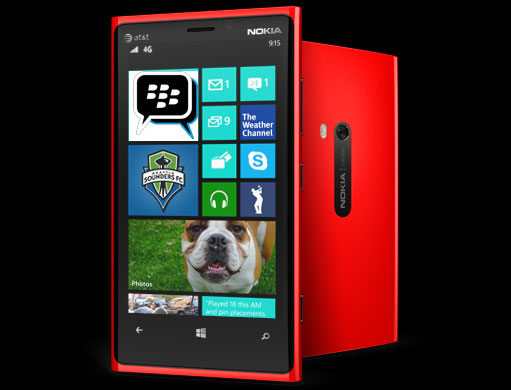
Beautifully designed, easy to use apps are a huge hit with customers. Over the last few releases, BlackBerry has made it easier for users of Windows Phone to sign up for and sign in to BBM. The latest release will also offer a native design users are accustomed to on their Windows phone.
This new version of BBM for Windows Phone will provide a native experience that incorporates the clean and modern design elements of the Windows Phone user interface.
The new interface focuses on the three core areas of the BBM experience - Chats, Contacts and Feeds. You can move between these 3 pages by swiping right and left. Common controls are found in the footer. Also users will be able to find additional controls in the menu that they can access through the 3 dots.
Contacts
There is a centralized place in Contacts where you can find all of your contacts - individuals as well as BBM Groups. You will be able to search for contacts, find friends and create new BBM groups using controls given at the lower part of the page. You can also pin one of your BBM contacts to your start menu. This provides for easy access.
 Chats
Chats
This page is a one-stop shop for all of your BBM Chats. From here, you will be able to start new chats or broadcast a message. You can attach images, voice notes, contacts etc. You will also be able to share photos from your gallery.
Feeds
Feeds allow you to find out latest news and information from your BBM contacts. And if you would like to comment on their new profile picture or status update, you only have to touch their name. You will be immediately taken to the chat window. You will also be able to quickly update your status.
Related posts

BlackBerry Passport Wins the Mobile Madness Contest Held by TechnoBuffalo
by - Apr 13, 2015 5:39 AM
Overview of Advanced Interactions in BlackBerry 10.3.1
by - Apr 10, 2015 5:31 AM

BlackBerry Launches BES 12 Cloud for SMBs and Enterprises
by - Apr 8, 2015 5:21 AM
BlackBerry Apps Once Again!
by - Apr 6, 2015 5:53 AM
BlackBerry Leap up for Pre-Order
by - Apr 3, 2015 5:41 AM

BlackBerry Has Turned Things Around
by - Apr 1, 2015 4:53 AM
The BlackBerry Care Protection Plan for the Passport and the Classic Introduced
by - Mar 30, 2015 1:44 AM
Home › Forums › Blackberry Getting To Launch BBM For Windows Phone With Native Look
This topic contains 0 replies, has 1 voice, and was last updated by Thea Neuman 2 years ago.
You must be logged in to reply to this topic.