

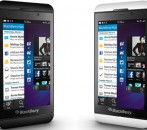


Blackberry Q10 Tutorials, and User Guides Now Accessible Online |
It seems like only yesterday we were tapping our fingers waiting around for the release of Blackberry’s first flagship device the Z10. Now, we’re doing the same exact thing as we wait for the release of the Q10, Blackberry’s first QWERTY equipped BB10 device. We’re right there, we can see the launch date in view yet it’s not quite here yet. That doesn’t mean we’re not gearing up getting ready to try out the latest and greatest.
It looks like Blackberry is doing the same thing and readying for the launch too. In fact, a whole slew of documentation, videos and pamphlets were released by Blackberry on the upcoming Q10. There’s nothing unveiled about the device that we didn’t already know, but it’s still great to look at. Let’s just say it’s enough to hold you over for a few days until the real thing is in your hands.
Want to read some of the documents for yourself? Go ahead, here are the links all neatly outlined for you. I’ll even break them down one by one with a short description.
- Safety and Product Information - BlackBerry SQN100 Q10-1 Smartphone
- Safety and Product Information - BlackBerry Q10 SQN100-2 Smartphone
- Safety and Product Information - BlackBerry SQN100 Q10-3 Smartphone
- Safety and Product Information - BlackBerry SQN100 Q10-5 Smartphone
- How To - Q10 BlackBerry Smartphone
- User Guide - BlackBerry Smartphone Q10
- Tutorials - For Devices with a Physical Keyboard
- Troubleshooting Wizard - BlackBerry Devices
The “Safety and Product Information” pamphlets are pretty straightforward. They tell you all the necessary safety information and regulations pertaining to the device in question. That’s where you’ll find the FCC compliance report and various warnings.
The “How To” guide is essentially an all-purpose FAQ that lists activities you might want to do on your device and how to go about doing them. It also outlines the inner workings of the Blackberry 10 operating system in full detail. Many of us already know a lot of this information from playing around with our Z10. New Blackberry owners are certainly encouraged to check most of this informative documentation out.
The Blackberry Q10 “User Guide” is, well, the user guide for the device. If you purchase a Q10, then one of these handy guides will come bundled up in the retail packaging with your phone. This is just a secondary digital copy in case you lose the other one. Of course, it’s available to look at now if you want to get a jump start.
The “Tutorials” video is also pretty straightforward. All you have to do is select an action or “tutorial” from the menu list and a short video will guide you through the process. For example, if you need to know how to set up BBM for the first time on your Q10, there’s a video that will take you through the entire process from beginning to end.
The “Troubleshooting Wizard” is a general help guide for when you run into problems. Obviously, you need the device in your hands first before you can run into any problems, but I digress. Right now there are only three problems, and their solutions, listed. Hopefully, Blackberry will expand this information over time to include more useful guides.
Well there you have it folks. If you’re really jonesin’ for some Q10 on the eve of the official launch, then you should definitely check out some of this helpful stuff.
Share the love
| Get free updates and win BlackBerry prizes |
People Who Liked This Article Also Liked...
- Blackberry Update 10.1 Rumored to Arrive Soon, Adds Several New Features
- Thorsten Heins on the Future of the Blackberry Playbook, and the BB10 OS
- Rumor: Blackberry 2013 Device Roadmap Revealed?
- Blackberry Unveils the Dev Alpha C; It's Like the Q10 but Not Really
- Blackberry Q10 Confirmed Specs and Features
Related Posts From Forum... Have Your Say!
This section is coming soon...














Forums Blackberry Q10 Tutorials, and Users Guides Now Accessible Online
This topic contains 0 replies, has 1 voice, and was last updated by Briley 1 week, 3 days ago.
You must be logged in to reply to this topic. Login Now!